
Home » Insights » Pre-Press & File Preparation » Print-Ready PDF for Printing in Uganda
How to Prepare a Print-Ready PDF for Printing in Uganda: A Complete Professional Guide

Preparing a print-ready PDF in Uganda is one of the most critical steps in the printing process. No matter how well written or designed a document is, if it is not correctly prepared for printing, the final output can suffer from layout errors, missing elements, poor alignment, or incorrect colours. Many printing issues do not originate from the printing machine itself but from the file preparation stage. This is why printing file preparation in Uganda is considered a foundational step in professional printing. It ensures that what you see on screen is exactly what will be produced on paper.
Before preparing your file, it is important to understand the broader workflow. Follow prepress file preparation insights.
What Is a Print-Ready PDF
A print-ready PDF is a final document prepared specifically for printing, containing all necessary formatting, layout, and technical settings required for production. Unlike editable documents such as Word files, a print-ready PDF locks all elements into place. This ensures that fonts, images, spacing, and layout remain consistent across devices and printing systems.
In PDF for printing in Uganda, a properly prepared file includes correct page size, margins, bleed, image resolution, and embedded fonts. These elements work together to eliminate errors during printing.
Why Print-Ready PDFs Are Important
The importance of print-ready PDF in Uganda lies in its ability to ensure accuracy, consistency, and predictability throughout the printing process. Without proper preparation, documents may shift during output, fonts may be substituted, and images may appear distorted or misaligned. A properly prepared print-ready file ensures that the final printed output matches the original design exactly. This is critical for maintaining professional standards, especially for books, manuals, and institutional documents where consistency across pages is essential.
A print-ready file guarantees that layout remains consistent, images print clearly, text alignment is preserved, and colours appear as intended. These elements work together to eliminate production errors and reduce the need for costly corrections. Professional printing services in Uganda rely on print-ready files to streamline production, avoid delays, and ensure that every document meets quality expectations from the first print run.
Understanding Document Size and Page Setup
One of the first and most important steps in printing file preparation in Uganda is setting the correct document size. This involves defining the final trim size, which determines the exact dimensions of the printed piece after cutting. If the document size is incorrect, content may be cut off, stretched, or improperly aligned during production. This can lead to inconsistencies across pages and reduce the overall quality of the final product.
Books, manuals, and reports typically follow standard sizes, and setting this correctly from the beginning ensures uniformity throughout the document. It also simplifies the printing and finishing process by aligning the file with production specifications. Accurate page setup forms the foundation of a print-ready file and prevents issues later in the workflow.
Margins and Safe Areas
Margins define the space between the content and the edge of the page, and they play a critical role in ensuring that important elements are not lost during trimming. In document formatting for printing, safe areas provide an additional buffer zone where essential content such as text, headings, and images should be placed. This ensures that even with slight variations during cutting, the content remains intact and readable.
Proper margin and safe area setup is especially important for books and manuals, where consistency across multiple pages is required. Poor margin planning can result in text appearing too close to the edge or being partially cut off. Maintaining well-defined margins improves both readability and the professional appearance of the document.
Understanding Bleed in Printing
Bleed refers to the extra area that extends beyond the trim edge of the document. It ensures that images, colours, and background elements extend fully to the edge after the document is cut. In prepress file preparation in Uganda, bleed is essential for any design that includes full-page visuals or coloured backgrounds. Without bleed, slight variations in trimming can leave unwanted white edges around the document.
A standard bleed is typically applied on all sides to ensure a clean and seamless finish. This small but important addition significantly improves the final appearance of printed materials. Proper bleed setup ensures that the document looks professional and polished after production.
Image Resolution and Quality
Images play a significant role in determining the overall quality of printed materials. Low-resolution images often appear pixelated, blurry, or unclear when printed, which reduces the professionalism of the document. In printing file preparation in Uganda, images should be of high resolution to ensure sharpness and clarity. It is also important to ensure that images are correctly sized and positioned to avoid distortion during printing.
Proper image handling ensures that visual elements complement the text and enhance the overall presentation of the publication. High-quality images contribute to a clean, professional, and visually appealing final product.
Font Embedding and Typography
Fonts must be embedded in the PDF to ensure that they display correctly during printing. If fonts are not embedded, the printing system may substitute them with default fonts, which can alter layout, spacing, and readability.
In desktop publishing in Uganda, typography is carefully structured to maintain consistency across the document. Embedding fonts preserves this structure and ensures that the final output matches the original design exactly. Proper font management is essential for maintaining professional formatting and ensuring that text appears as intended in the printed version.
Learn more about insights for typography rules for printing.
Colour Settings for Printing
Colour behaves differently in print compared to digital screens. What appears bright and vibrant on a screen may print differently if the file is not properly prepared. In printing services in Uganda file requirements, correct colour settings ensure that colours are reproduced accurately during printing. Preparing files with appropriate colour specifications helps avoid unexpected variations in the final output. Consistent colour management is particularly important for branded materials, reports, and publications where visual identity must be maintained.
Explore Print-Ready PDF standards
Exporting to Print-Ready PDF
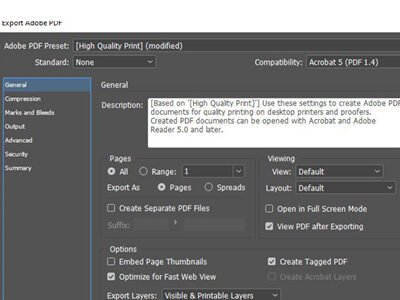
Once all elements are correctly prepared, the document must be exported as a PDF using appropriate settings. This step finalises the file and prepares it for production. In PDF for printing in Uganda, export settings must preserve layout, embed fonts, and maintain image quality. These settings ensure that the document remains stable and prints exactly as designed. A properly exported PDF eliminates the need for adjustments during printing and reduces the risk of errors.
Pre-Press Checks and Validation
Before sending a file for printing, it must undergo final checks to ensure that all elements are correctly aligned and properly formatted. In prepress file preparation in Uganda, validation includes reviewing margins, bleed, image resolution, and overall file structure. This step helps identify and correct issues before production begins. Pre-press checks act as a quality control stage, ensuring that the document meets all technical requirements and is ready for printing.
Common Mistakes in Print File Preparation
Many printing issues arise from avoidable mistakes made during file preparation. These include missing bleed, incorrect margins, low-resolution images, unembedded fonts, and incorrect page size. Such errors can lead to poor print quality, misaligned content, or production delays. In some cases, they may require the entire document to be corrected and reprinted. Understanding and avoiding these mistakes is essential for ensuring smooth production and achieving professional results.
How Professional Desktop Publishing Improves File Preparation
Professional desktop publishing in Uganda ensures that documents are structured correctly before being exported into print-ready format. This includes layout consistency, typography control, and proper formatting. By preparing documents professionally, errors are minimised, and the transition from design to printing becomes seamless. This improves both efficiency and final output quality.
Explore our desktop publishing services.

How Njagi Creative Ensures Print-Ready Files
Njagi Creative provides structured support for printing file preparation in Uganda, ensuring that all documents meet technical and production requirements before printing begins. By combining layout preparation, pre-press validation, and production planning, each project is handled with precision and attention to detail. This approach ensures consistent, high-quality results for books, manuals, and institutional publications.
Explore our editorial prepress services

About the Author Nsenga Peter Daniel
Nsenga Peter Daniel is a desktop publishing consultant with over 20 years of experience in printing systems, book layout design, and institutional document preparation in Uganda. Through Njagi Creative, he has worked on books, manuals, reports, and institutional publications, helping organisations improve clarity, structure, and print quality. His expertise in typography, layout, and document formatting supports clients in producing professional and print-ready materials. Follow on Linkedin.
Frequently Asked Questions about Creating a print-ready PDF in Uganda
What is a print-ready PDF
A print-ready PDF is a file prepared with all the necessary settings required for professional printing, including correct layout, margins, bleed, embedded fonts, and image quality. It ensures that every element of the document remains fixed and prints exactly as designed, without unexpected changes during production. This makes it the most reliable format for consistent and high-quality printing.
Why can’t I print directly from Word
What is bleed in printing
What resolution is required for printing
Do I need professional help for file preparation
Need help preparing your document for printing, share your project details and get professional support.